 ChatGPT,
 Claude,
 Gemini,
 Grok — all four for
Key highlights
- Web hosting is a broad umbrella term for services that make websites accessible online. It includes shared hosting, WordPress hosting, VPS hosting, dedicated hosting and cloud hosting.
- WordPress hosting is a type of web hosting configured specifically for websites built on WordPress.
- WordPress hosting is a strong fit when you want simpler WordPress setup, easier updates, built-in performance tools and site management support.
- Shared web hosting can be a practical starting point for simple websites, portfolios and small business sites that need a general-purpose hosting plan.
- For most WordPress websites, WordPress hosting is the more practical starting point.
- For custom applications, advanced configurations or server-level control, VPS, dedicated or cloud hosting may be more appropriate.
Choosing between WordPress hosting and web hosting affects how you set up, manage and grow your website. The wrong fit can leave you doing extra technical work, while the right one can make everyday site management easier.
The two options are closely related. All WordPress hosting is web hosting, but not all web hosting is built for WordPress. Web hosting is the broader category, while WordPress hosting is one hosting type within that category. A standard shared hosting plan can usually run a WordPress site, while WordPress hosting is designed around how WordPress websites are installed, maintained and managed.
That difference matters when you compare setup, site management, resources, maintenance, support and cost. In this guide, we’ll compare WordPress hosting vs web hosting across the areas that matter most, so you can choose the right option for your website.
Quick comparison: WordPress hosting vs web hosting
The main difference between WordPress hosting and web hosting is focus. Web hosting is the umbrella category that includes shared hosting, WordPress hosting, VPS hosting, dedicated hosting and cloud hosting. WordPress hosting is one type of web hosting built around WordPress setup and site management.
| Feature | WordPress hosting | Web hosting |
| Best for | Websites built on WordPress | Different hosting needs, including shared websites, WordPress sites, VPS, dedicated hosting and cloud hosting |
| Setup | WordPress-ready setup, often with guided installation | Depends on the hosting type. Shared hosting gives a general-purpose setup, while VPS and dedicated hosting offer more advanced control |
| Performance | Often includes WordPress-specific caching and optimization | Depends on server resources, plan type and manual configuration |
| Security | May include WordPress-focused updates, malware tools and hardening | Usually includes broader hosting security, with WordPress maintenance handled separately |
| Support | Better fit for WordPress-specific questions | Better fit for general hosting, domains, DNS, email and server access |
| Flexibility | Best when you know the site will use WordPress | Varies by hosting type. Shared hosting works for common websites, while VPS or dedicated hosting may fit advanced needs |
| Cost | May cost more if managed WordPress features are included | Often more affordable at the entry level |
| Best choice if | You want a simpler WordPress experience | You want a general-purpose shared hosting plan or need another hosting type based on your website requirements |
WordPress hosting gives you a more focused WordPress experience. Web hosting gives you different hosting options based on your website’s size, platform, resources and technical needs. To understand which one fits your website, start with what each hosting type actually does.
What is web hosting?
Web hosting is a broad umbrella term for the service that makes a website accessible online. It includes different types of hosting, such as shared web hosting, WordPress hosting, VPS hosting, dedicated hosting and cloud hosting.
At its core, web hosting stores your website files, databases, images and other resources on a server. When someone types your domain name into a browser, the hosting server delivers your website so the visitor can view it.
You can use different types of web hosting for WordPress, another CMS such as Joomla or Drupal, a custom-coded website, an ecommerce store or a web application. The right hosting type depends on how much control, storage, performance, scalability and support your website needs.
The main benefit of web hosting as a category is choice. Shared hosting can work well for simple websites, portfolios and small business sites. VPS, dedicated or cloud hosting may be better for websites that need more resources, advanced configurations or server-level control. If your website runs on WordPress, a WordPress hosting plan can reduce the manual work needed for setup, caching, updates and security.
Read more: What is Web Hosting? How to Launch a Website the Right Way
What is WordPress hosting?
WordPress hosting is a hosting environment designed for websites built with WordPress. It is still web hosting, but the setup, tools and support are usually tailored to WordPress-specific needs.
A WordPress hosting plan may include WordPress pre-installation, a dashboard, automatic core updates, caching, staging environments, backups, malware scanning and support for common WordPress issues such as plugin conflicts or theme errors.
This makes WordPress hosting useful for beginners, bloggers, business owners and site managers who want fewer technical steps. It can also help experienced WordPress users who want a hosting setup built around the way WordPress sites are managed.
Also read: Best WordPress Hosting in 2026: Pricing & Features Compared
Are WordPress hosting and web hosting completely different?
Not really. WordPress hosting and web hosting are not completely separate categories. WordPress hosting is a specialized form of web hosting.
A standard web hosting plan can usually run a WordPress site. The difference is that WordPress hosting is packaged around WordPress-specific tasks such as setup, updates, caching, security and support.
Think of web hosting as the foundation that keeps a website online. WordPress hosting gives you that same foundation with tools and settings built around WordPress site management.
Key differences between WordPress hosting and web hosting
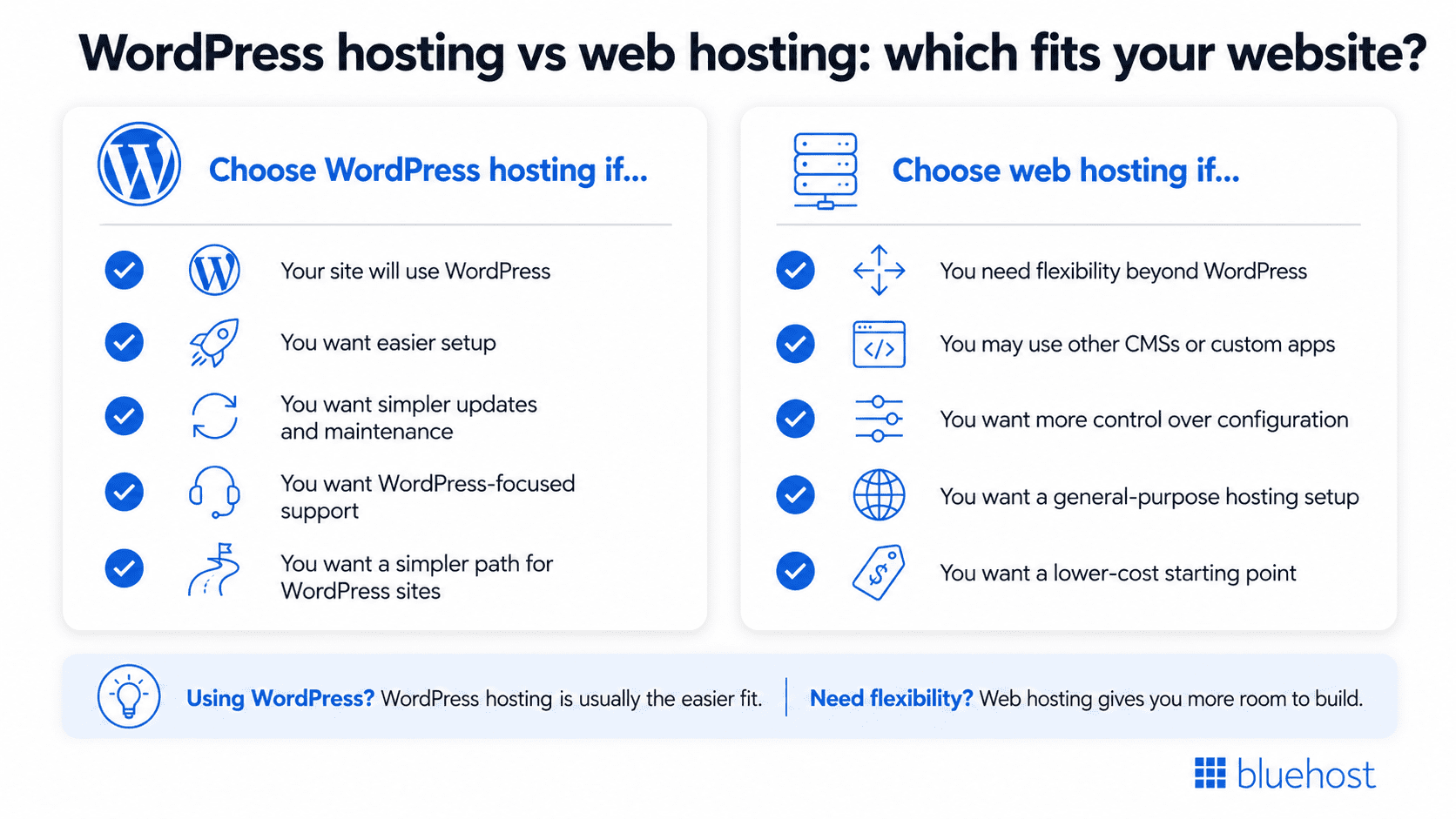
The difference between web hosting and WordPress hosting becomes clearer when you compare how each option handles setup, performance, security, support, control and cost.
1. Setup and ease of use
WordPress hosting is usually easier for people who already know they want to build with WordPress. Many plans include guided setup, one-click or pre-installed WordPress, a WordPress-focused dashboard and tools for common WordPress tasks.
General web hosting gives you a more standard hosting environment. You may still be able to install WordPress through a control panel, but the experience is not always centered on WordPress. That can add extra setup steps for beginners.
2. Performance and optimization
WordPress websites rely on themes, plugins, databases and dynamic content. Most WordPress hosting often includes performance features designed for those needs, such as server-level caching, CDN integration, image optimization or database optimization.
Standard web hosting can also perform well, especially on plans with stronger resources or proper configuration. The difference is that optimization may be more hands-on. If you use standard web hosting for WordPress, you may need to choose caching tools, adjust performance settings and monitor resource usage yourself.
3. Security and updates
Every website needs security, but WordPress sites have specific maintenance needs because the WordPress core, themes and plugins all need regular updates. WordPress hosting often includes security features such as automatic core updates, malware scanning, plugin vulnerability monitoring, backups and login protection.
General web hosting usually includes broader security tools such as SSL, server monitoring and backup options. WordPress-specific hardening and update management may still be the site owner’s responsibility.
4. Support
Support is one of the most practical differences between web hosting and WordPress hosting. With WordPress hosting, support teams are more likely to understand WordPress-specific problems such as plugin conflicts, theme errors, dashboard issues and update failures.
With general web hosting, support usually focuses on domains, DNS, email, control panel access, server resources and hosting account issues. That support is still valuable, but it may not cover WordPress troubleshooting in the same depth.
5. Flexibility and control
WordPress hosting is more focused. That focus is useful when WordPress is your main platform, but it may not be the right fit if you need a non-WordPress setup or advanced server-level customization.
WordPress hosting is more focused. That focus is useful when WordPress is your main platform, but it may not be the right fit if you later want to run a non-WordPress application or need advanced server-level customization.
6. Cost
Standard web hosting is often more affordable at the entry level. This can make it attractive for new websites, portfolios and simple business sites.
WordPress hosting may cost more when it includes managed features, stronger WordPress support, staging, backups or security tools. That added cost can be worthwhile if it saves time and reduces technical maintenance.
Pros and cons of web hosting vs WordPress hosting
Every hosting choice has tradeoffs. Web hosting gives you more flexibility. WordPress hosting gives you a setup built around WordPress.
| Hosting type | Pros | Cons |
|---|---|---|
| Web hosting | Flexible for different website types Often affordable for beginners More room for custom setups Useful for non-WordPress projects | May require more WordPress setup Less WordPress-specific support More manual performance and security work |
| WordPress hosting | Easier for WordPress websites Built around WordPress setup and management Often includes WordPress-focused performance, security and support tools | Limited value for non-WordPress sites May cost more than basic hosting Less suitable for non-WordPress projects or advanced server-level customization. |
If you want more control across different platforms, web hosting gives you room to configure. If you want WordPress tasks handled more smoothly, WordPress hosting is usually easier to manage.
Web hosting vs WordPress hosting: Which should you choose?
The easiest way to choose is to start with your website platform. If WordPress is the foundation of your site, WordPress hosting gives you a more focused setup. If your project needs flexibility beyond WordPress, standard web hosting may be the better fit.
1. Choose web hosting if…
- You want a flexible hosting setup that can support WordPress, other CMSs or custom-built websites.
- You are still deciding which platform or CMS your website will use
- You want more flexibility in how your hosting environment is set up, depending on the plan you choose.
- You are comfortable managing setup, performance and security.
- You want a flexible starting point that can support different types of websites.
2. Choose WordPress hosting if…
- Your website will be built on WordPress.
- You want a simpler setup process and a dashboard built around WordPress tasks.
- You prefer WordPress-focused performance, security and update tools.
- You want support that understands common WordPress issues.
- You would rather spend less time on technical maintenance and more time working on your site.
The better option depends on what you plan to build and how much technical control you want.
Once you know which hosting type fits your website, the next step is choosing a provider that supports that path without adding unnecessary complexity. Bluehost offers different hosting solutions, including Shared Web Hosting, WordPress Hosting, VPS Hosting and Dedicated Hosting, so you can choose based on how your site will be built and managed.
How Bluehost supports both hosting paths
At Bluehost, we offer different hosting solutions for different website goals, including Shared Web Hosting and WordPress Hosting.
If you are building with WordPress, our WordPress Hosting gives you a more focused environment for WordPress installation, site management, performance and support.
If you need a general-purpose shared hosting plan for a simple website, portfolio or small business site, our Shared Web Hosting may be a practical starting point. For advanced configurations, custom applications or server-level control, VPS or Dedicated Hosting may be a better fit.
1. Bluehost Web Hosting
Our Shared Web Hosting is designed for users who want a flexible hosting environment. It can support WordPress, but it is not limited to WordPress-only use cases. This makes it useful for personal projects, small business websites, portfolios and users who may want to work with different platforms over time.
It may be a good fit if you want a cost-conscious starting point, standard hosting tools or more flexibility outside a dedicated WordPress setup.
Key features:
- Support for one or more websites, depending on the selected plan
- Storage and bandwidth options based on plan level
- SSL options for protecting visitor data
- Domain, email and site management tools
- A hosting dashboard for managing account and website settings
- Upgrade paths if your website needs more resources later
2. Bluehost WordPress Hosting
Our WordPress Hosting is a stronger fit when your website will run on WordPress. It is designed around WordPress setup and site management, which can make the experience easier for beginners and more efficient for teams managing WordPress sites.
If your main goal is to create, manage and grow a WordPress website, this option keeps the hosting environment closer to the way WordPress sites work.
Key features:
- WordPress installation and setup tools
- A WordPress-focused dashboard and site management experience
- WordPress update tools, depending on the selected plan
- Performance tools designed for WordPress websites
- Security and backup options, depending on plan
- Support for common WordPress setup and management questions
- Scalable options as the site grows
Whether you are building a WordPress site or need a flexible hosting setup, we give you both paths in one place. Choose Bluehost WordPress Hosting if WordPress is your main platform. Choose Bluehost Web Hosting if you want more flexibility for different site types or custom projects.
Final thoughts
The difference between WordPress hosting and web hosting comes down to fit. A WordPress-ready setup can make it easier to launch, manage and grow a WordPress website. Web hosting is the broader category, with options such as shared hosting, WordPress hosting, VPS hosting, dedicated hosting and cloud hosting.
If you are ready to move from comparison to setup, Bluehost gives you both paths. Choose Bluehost WordPress Hosting if WordPress is your main platform, or choose Bluehost Web Hosting if you need a flexible hosting environment for different types of websites.
Explore Bluehost hosting options and choose the plan that fits your website.
FAQs
Web hosting is an umbrella term for services that make websites accessible online. It includes shared hosting, WordPress hosting, VPS hosting, dedicated hosting and cloud hosting. WordPress hosting is a type of web hosting configured specifically for WordPress websites, with tools for setup, performance, security, updates and site management.
Yes. WordPress hosting is a specialized form of web hosting. It uses hosting infrastructure to keep your website online, but the tools and environment are designed around WordPress.
Yes. Many shared web hosting plans can run WordPress, depending on your website needs and plan resources. You may need to handle more setup, optimization, updates and security tasks yourself compared with a WordPress hosting plan.
WordPress hosting is usually better for websites built on WordPress because it is designed around WordPress management. Web hosting is the broader category, so the better choice depends on whether you need shared hosting, WordPress hosting, VPS, dedicated hosting or cloud hosting.
Often, yes. WordPress hosting can make setup and management easier because it may include guided installation, a dashboard built around WordPress, automatic updates and support for common WordPress issues.
Basic shared web hosting can be cheaper than WordPress hosting, especially at the entry level. WordPress hosting may cost more if it includes managed updates, backups, security tools or WordPress-specific support.
No. You do not always need WordPress hosting to use WordPress. A standard web hosting plan can often support WordPress, but WordPress hosting is usually easier if WordPress is the main platform for your site.
If your website will be built on WordPress, choose WordPress hosting if you want simpler setup, tools built around WordPress and relevant support. Choose shared web hosting only if you are comfortable handling more WordPress setup and maintenance yourself.


Write A Comment